A proud, festive save the date
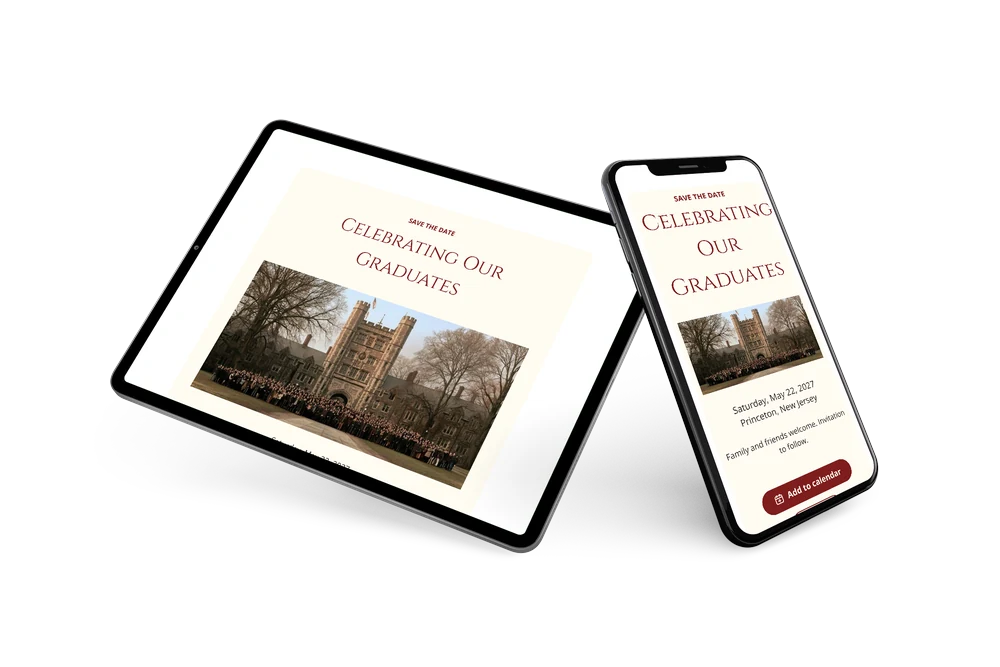
A graduation save the date is a short web page that tells family and friends when the party takes place. A photo of graduates before a historic stone university building opens the page. The name follows in stately crimson capitals on a cream card.
It suits parents planning a party, and schools or student groups celebrating a class. Commencement season is busy, so early notice helps. Share one link by text or email. Guests add the date to their calendar and reply early. Later, send a full online event invitation.
Create your own online save the date
Use this design as a starting point and create a fitting save the date within minutes.
Frequently asked questions
How quickly can I send this save the date?
Usually within a few minutes. Enter the name of the celebration, the date and the town, and share the link.
What can guests do with it?
They can add the date to Google, Apple or Outlook calendar with one tap and reply through the RSVP button. Replies come together in your dashboard. Read how to add an event to a calendar.
What does the line at the bottom say?
In the sample it reads ’Family and friends welcome. Invitation to follow.’ It shows that the party is open to the wider circle and that details follow. You can rewrite it, for example to name the graduate or the school.
Can I change the text and colors?
Yes. You can change the heading, the closing line and swap crimson for your school color. The date and place are filled in from your details, and the card stays editable after sending. In the full invitation you can also share the event location.
Is this save the date free?
Yes, creating and sharing the save the date is free. A full invitation can be made later on Eventinfo.pro.

All example invitations are fictional. Photos of people are AI-generated; illustrations are licensed or AI-generated.