Changing your account details and password
You change your name, email address and password on the Account page, which you’ll find in the dashboard navigation.
Name and email address
- Go to Account.
- Under User details, change your First Name, Last Name or Email address.
- Click Save changes.
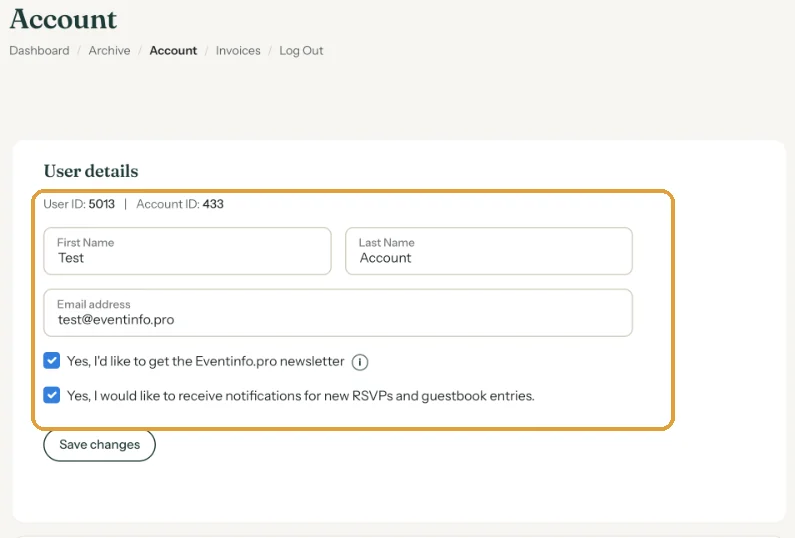
A new email address is also your new login. Notifications about new RSVPs will go there from now on.
The new address must be a valid e-mail address that doesn’t already belong to another account; otherwise you’ll see a message saying it’s already in use. Your first name is required. After saving, your old address gets an e-mail about the change, so nobody can take over your account unnoticed (E-mail saying your password or e-mail address changed).
Changing your password
- Next to Change password, click Edit.
- Enter your Current password, then the New password (min. 12 characters).
- Click Save changes. If you see Incorrect password, the current password was wrong.
Can’t remember your current password? Log out and choose a new one on the login page; see Forgot your password or can't log in.
After saving, you get a confirmation by e-mail.
Next step: Newsletter and notifications
Last updated: November 11, 2026
- Your dashboard at a glance
- Updating your event settings
- Duplicating an invitation
- Forgot your password or can't log in
- Archive or delete
- Changing your account details and password
- Deleting your account
- Newsletter and notifications
- Which e-mails do you get from Freesavethedate.online?
- E-mail saying your password or e-mail address changed