Newsletter and notifications
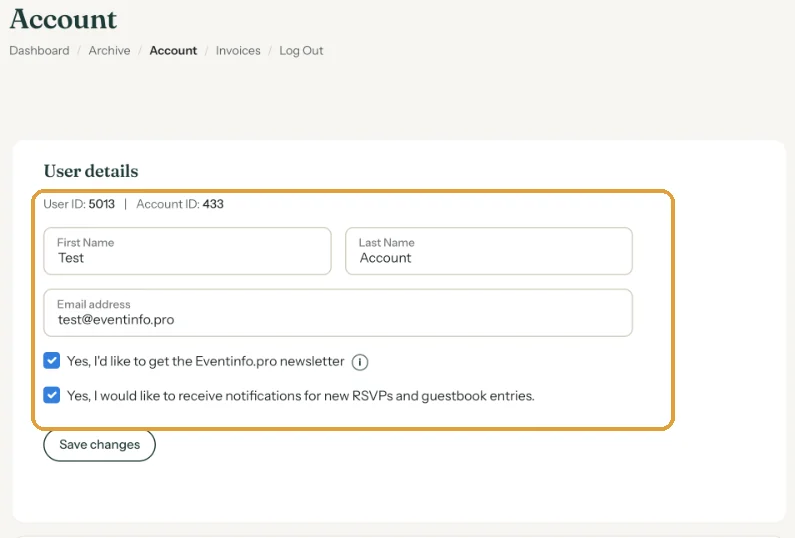
The Account page has two tick boxes: one for the Eventinfo.pro newsletter and one for notifications when guests respond to your invitation.
The newsletter
The tick box reads Yes, I’d like to get the Eventinfo.pro newsletter. It arrives at most once a month, with tips and inspiration. Unsubscribe with this tick box or with one click at the bottom of the newsletter.
RSVP notifications
The second tick box is Yes, I would like to receive notifications for new RSVPs and guestbook entries. A notification is an email with the guest’s name and message. It goes to the email address of whoever created the invitation. It arrives in the language of your account and includes the name of the invitation. Reply to it and your e-mail goes straight to the guest. With the box unticked, replies are still saved; you just don’t get an e-mail about them.
All responses are also always in your dashboard, under RSVP.
Changing the settings
- Go to Account.
- Tick or untick the boxes.
- Click Save changes. Without saving, nothing changes.
Reminders, offers and newsletters can also be stopped with the unsubscribe link at the bottom of those e-mails (Turning off reminders and other e-mails). For an overview of every e-mail, see Which e-mails do you get from Freesavethedate.online?.
Last updated: November 11, 2026
- Your dashboard at a glance
- Updating your event settings
- Duplicating an invitation
- Forgot your password or can't log in
- Archive or delete
- Changing your account details and password
- Deleting your account
- Newsletter and notifications
- Which e-mails do you get from Freesavethedate.online?
- E-mail saying your password or e-mail address changed